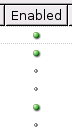
Stylish - Use prettier enabled/disabled icons

Stylish - Use prettier enabled/disabled icons
7
*****
Last updated Sep 18 2007
43 installs this week, 4557 total.

Darn website snipping the title. Should be "Stylish - Use prettier enabled/disabled icons in the Manage Styles window", since that's more explanatory.

2007-09-18: Fixed it not working in recent versions of Stylish. Sorry about not maintaining my styles for so long. I'd been using Opera for the past few months, but I just switched back to Firefox, so I should be doing a better job from here on out. (I guess I should update the screenshots too, and also see about replacing the checkmark icon in the bar at the top.)

Before
After

Install options

Feedback

Reviews

kindofabuzz said on Jul 17 2008

Works fine with Stylish 0.5.7 and Firefox 3.0.1 *****

ddsafsdfgs said on Mar 22 2008

Great... Works with FF3 Beta 4 (I use Portable) *****

XerBlade said on Sep 06 2007

Since this hasn't been updated in a very long time, and it hasn't worked in the newer versions of Stylish for some time now... to make this work, all you have to do is change url-prefix(chrome://stylish/content/stylish.xul) to url-prefix(chrome://stylish/content/manage.xul)
This is my personal favorite of all the Stylish checkmark-changing styles out there, and I didn't want to create a whole new style for such a minor change. I'd rather leave the credit (and install count) with the person who put it up in the first place. *****

JuanBR said on Jul 13 2007

Strange, it doesn't work here, but I Like it! *****

neko said on Apr 07 2007

*****

brim4brim said on Jan 21 2007

****

libshh said on Jan 04 2007

nice touch! *****

troubled said on Nov 15 2006

quite nice ****

rerunx5 said on Sep 05 2006

Thanks for making this. *****

Zathman said on Jul 10 2006

Nice. Since I use a black firefox theme (EarthShift) I wasn't able to see the black check marks, so this helps alot. Thanks much!

timendum said on Jun 08 2006

Much better! *****

Lanik said on May 07 2006

Thanks I'm loving them. *****

Kid_ReeFer said on May 01 2006

It gets even better I added url(chrome://stylish/content/stylish.xul?sidebar=1) after the first url and now I've got dots in my sidebar! This things just keeps getting better and better! A must have!!!! *****

RaveN said on Apr 16 2006

Looking good *****

Paulfox said on Apr 13 2006

Great tweak! I made one small adjustment, which might help Lee Dailey - and that is I wiped out the whole first "treechildren." section & started with 2nd one (treechildren::-moz-tree-checkbox(checked)) - now, disabled = nothing, enabled - green dot. Even more intuitive and cleaner. Great script Peng, thanks. *****

Lee_Dailey said on Apr 08 2006

this would be nifty IF the icons were more easily identified when hilited. the current enabled/disabled status is not clearly DIFFERENT to me when hilited. **

jk- said on Apr 04 2006

Out of the available styles to change these icons; this one is the best. *****