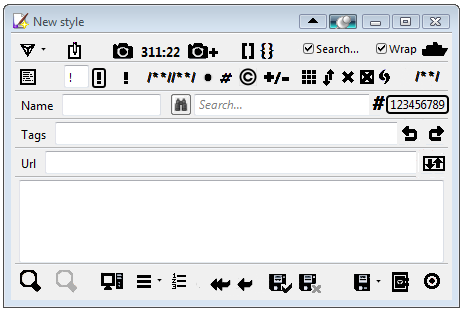
Stylish Custom Editor - Button Icons (NO Text)

Stylish Custom Editor - Button Icons (NO Text)
13023
23735

Install

The recommended way to install user styles is to use Firefox with Stylish.

If you already have Firefox with Stylish, make sure this site is allowed to run JavaScript.

By Barbiegirl.
Created Dec 30 2009, last updated Mar 07 2010.
15 installs this week, 216 total.
Average rating: Good

CREATED DEC 30 2009

Stylish Custom Editor - Toolbar Buttons are icons without any text.

* 26 icons so far. Insert, External editor, Page, auto!important;, !important, Clear Button for the Findbar, Clear Button for the ScratchPad, Toggle ScratchPad, Merge, Comment, Comment Group, Export Style, Preview, Un-Preview, Insert Text, Flashback, Add Flashback, Customize Toolbarbutton Window, Save Enabled, Save Disabled, Save, Revert(Last Save), Revert(Original), LineNumberSearch Button, Close, Findbar Findbutton (More icons to come).
* Icons are not too colorful, so they are less distracting and are Mac-like.
* Look in the code, there are a few ICON choices to choose from if you like. Example: Save Enable has a black checkmark or you can choose it with a GREEN CHECKMARK.

Firefox Addon: Stylish Custom https://addons.mozilla.org/en-US/firefox/addon/12105

ALL MY STYLES: Barbiegirl

* I HIGHLY RECOMMEND THIS PERFECT BUTTON written by rawny called "Stylish Quick Edit":
http://custombuttons2.com/index.php?q=en-us/forum/buttons/buttons-database/stylish-quick-edit.html
---------------------------------------------------------------------------------------------------------------------
UPDATE:
* Insert icon is changed from blue to black, but blue is still in code (commented) for choice.

UPDATE:
* Comment Button is thicker.
* Added hover effect. I deliberately set Icons to shift when clicked, for effect.
* Removed the blue hover for the findbar find button.
UPDATE:
* Changed Comment icon -removed the box border.
UPDATE:
* Changed Save Enabled.
UPDATE: Added auto!important;(Removed the auto!important text, and REPLACED THE CHECKMARK with an icon. Saves space.)
* Checkmark a bit lower and thicker for the Save Enabled icon. (ALSO another choice:Save Enable icon with a GREEN CHECKMARK)
* Save Disabled CROSS X is lightgrey. You can choose black X instead.
* Added icon choices (commented) for the Save Enabled Button: The word Save with a black checkmark, and the word Save with a green checkmark.
* Added "black X" Icon for Clear Button for the findbar searchbox.
UPDATE: External editor icon is thicker bolder and transparent inside.
* Added code for next version 6.9 (without this added code, icons won't show)
* Checkboxes are smaller and transparent, and label text is smaller and is moved closer to it's checkbox.
UPDATE:
* Improved the appearance of the Clear button Black X (added px for perfect symmetry.)
* ADDED CODE to prevent Clear button icon from disappearing.
UPDATE:
* REMOVED WORD "Search" in the findbar - you can change it to smaller font and lighter color to be less noticeable.
* Removed the search icon in the findbar, but keep it's clear x icon.
* "Comment Group" Button icon.(2 choices).
* REMOVED code that caused findbar to have less width. Sorry!
* REMOVED bit of code that blocked function of removing findbar search icon.
* UPDATED to version 0.7.2 - Changed code for FINDBAR Binocular button because this button is now a toolbarbutton.

* UPDATE: Added "Flashback" icon. Removed the Line Count label.
* Added @-moz-document url-prefix. Made the Line Count textbox transparent.
* UPDATE: icon for new button that opens up the Customize Toolbarbutton Window.
* "Add Flashback" icon.
* UPDATE: Latest version has changed id Code for Line Count Number - adjusted code (removes the text word Line and centers number)
* UPDATE: Added another icon choice for the Button that opens the Customize Toolbarbutton window. Smaller Revert(Last Save) and Revert(Original) icons.
UPDATE: Findbar binocular button is more symmetrical.(new stylish custom version had distorted measurements).
UPDATE: ADDED LineNumberSearch Button icon.
UPDATE: Changed measurements for LineNumberSearchButton because latest version 0.7.4 on the forum altered them.
UPDATE: Changed label for LineNumberSearchButton because latest version 0.7.4 on the forum changed it from LineS: to Line#.
Note: LineNumberSearch seems to change a bit on different toolbars- so adjust px if needed.
UPDATE: Added "Clear ScratchPad" icon.(Black X inside a square box scratchpad)
UPDATE: Added "Toggle ScratchPad" icon.
UPDATE: Scratchpad Open/Close Bar is 600px wide and thicker and transparent. Borders removed.(Can adjust px)
UPDATE: Export Style icon.
UPDATE: Toggle Scratchpad icon is resized smaller. (Sorry but I'm making icons from scratch in paint-very difficult for me)
-----------------------------------------------------------------------------------------------------------------------------

Discussions [Start new]

Mail the admin.