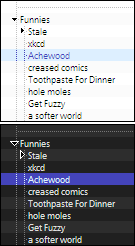
Firefox's Bookmarks Sidebar, Bookmarks Manager, History Sidebar, and Scrapbook's Sidebar* chrome styled for:
- smaller fonts and rows
- tiny twisties: black arrows with a white border
- hidden (fav)icons
Be sure to restart Firefox after enabling the style to ensure complete stylage.
Included and pictured in the "after" screenshot are both a light (default) and a dark style, each with a blue selection color accent. Comment one out and uncomment the other to switch between them (or copy to a new style and use Stylish to toggle between them).
For further minimalism, uncomment any of the code near the top to hide search boxes or toolbars.
For themes that use fonts which don't work well at small sizes, uncomment the line of code near the top to specify a custom font face.
* Scrapbook is an extension: https://addons.mozilla.org/en-US/firefox/addon/427
--
Update (2008/5/31): Fixed that annoying selection bug (only the first selected row would have a background indicating it, even if multiple rows selected)
Update (2007/9/3): Fixed tree styles. Now the entire rows in the bookmark and history managers are colored.
Update (2007/7/14): Added chrome address and optional search box style for Scrapbook's sidebar.
Update (2007/7/14): rio: that's something I hadn't considered with small font sizes. Uncomment the line after "change font" to modify the font face used; I set Tahoma as the default there. Thanks for the suggestion!
Update (2007/7/13): Yes, Ron A., it seems to work nicely with the history panel. Thanks for the suggestion!
great style
and for those use Gmarksurl(chrome://gmarks/content/gmarksSidebar.xul),
Very simple. I like it.
Brilliant, thanks, and it works on Scrapbook too.
Great style. :)
Is there any way to apply this to the History sidebar, too?
thanks, looks really cool :D