The recommended way to install user styles is to use Firefox with Stylish.
If you already have Firefox with Stylish, make sure this site is allowed to run JavaScript.
You've installed this user style in Stylish. To uninstall it, open the Tools menu, choose Add-ons, click the User Styles panel on the top, click on the entry for this user style, and click Uninstall.
Like customizing Firefox? Customize your new tabs with New Tab King.
You've installed this user style in Stylish. To uninstall it, open the Tools menu, choose Stylish, and remove the entry from there.
You've installed this user style in Stylish, but a newer version is available.
To uninstall this user style, open the Tools menu, choose Add-ons, click the User Styles panel on the top, click on the entry for this user style, and click Uninstall.
Like customizing Firefox? Customize your new tabs with New Tab King.
The recommended way to install this user style is to .
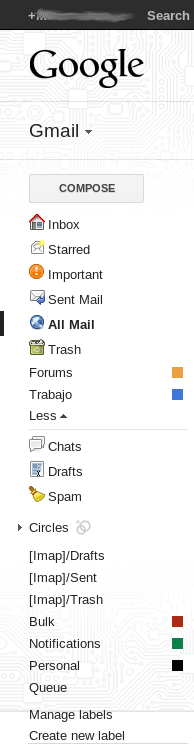
This script attempts to add or replace icons by of the tango desktop project, but only when enabled the experimental features (gmail labs).
The languages supported are: Spanish (my native language), English (US-UK), Danish, German, French, Italian, Nederlands, Polish, Portuguese (BR-PT) and Russian (by Siarhei Niakhai).
TODO:
- Making it work when disabled the experimental features (gmail labs), without creating a specific version. - Making it work when enable the experimental feature "websearch".
CONTRIBUTE:
If your language isn't in the list above, You can contribute sending the translation of the options: inbox, starred, chats, sent mail, drafts, all mail, spam and trash in a file with UTF-8 encoding, follow this template:
I would be grateful if you can donate a few cents...
Enjoy!
ChangeLog:
29/Jan/2010 Marco Antonio Frias B. <marcoantoniofrias AT gmail DOT com> * Last update. 18/Jul/2009 Marco Antonio Frias B. <marcoantoniofrias AT gmail DOT com> * Initial project.