The recommended way to install user styles is to use Firefox with Stylish.
If you already have Firefox with Stylish, make sure this site is allowed to run JavaScript.
You've installed this user style in Stylish. To uninstall it, open the Tools menu, choose Add-ons, click the User Styles panel on the top, click on the entry for this user style, and click Uninstall.
You've installed this user style in Stylish. To uninstall it, open the Tools menu, choose Stylish, and remove the entry from there.
You've installed this user style in Stylish. To uninstall it, click the wrench icon, Extensions, click Options beside the entry for Stylish, and click delete for the appropriate entry.
You've installed this user style in Stylish, but a newer version is available.
To uninstall this user style, open the Tools menu, choose Add-ons, click the User Styles panel on the top, click on the entry for this user style, and click Uninstall.
The recommended way to install this user style is to .
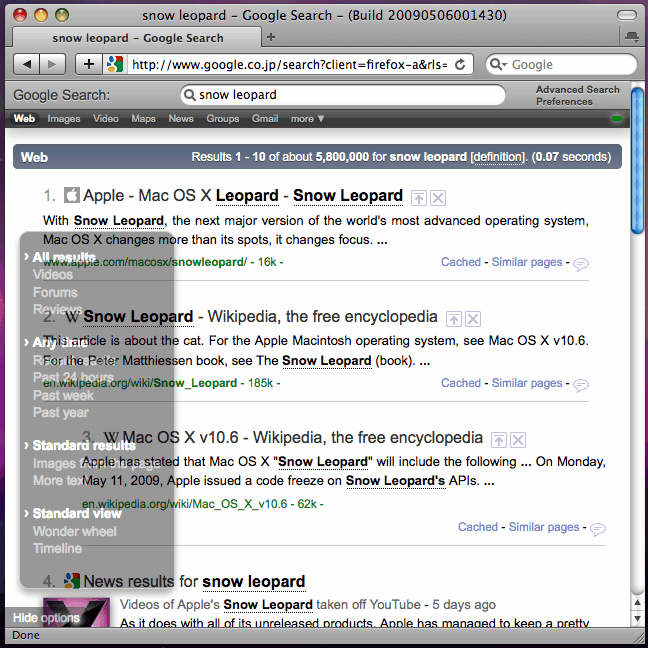
Top search box is fixed for easy operation when using Autopagerize greasemonkey script. I use modified version by os0x: http://github.com/os0x/autopagerize/tree/master In screenshot below, faviconize greasemonkey script: http://userscripts.org/scripts/show/34035 by janus_wel is also used.
There is fancier balloon for options. It uses codes which works only with Firefox 3.5 or Safari so it is commented out for now. If you are advanced user, you can enable it in the code.
NOTE: There is some problem displaying if you are using Adblock Plus extention. See discussions for more.
2009.07.01: FIXED removed justified line that causes crash in some cases. [1840] 2009.06.11: FIXED code change in Google. [1356] 2009.05.24: CHANGED halve the header for more space and some other tweaks. FIXED better appearance in Safari. [700] 2009.05.16: DELETED footer (was actually redundant). FIXED some ads problems. [70] 2009.05.14: ADDED footer. FIXED to keep up with recent change (search options). [31] 2009.05.10: Initial release.