Google Reader: Mac OS X Snow Leopard

Google Reader: Mac OS X Snow Leopard
20999
16900

Install

The recommended way to install user styles is to use Firefox with Stylish.

If you already have Firefox with Stylish, make sure this site is allowed to run JavaScript.

By m.mike kondo.
Created Apr 10 2009, last updated Jul 18 2009.
646 installs this week, 12952 total.
Average rating: Good

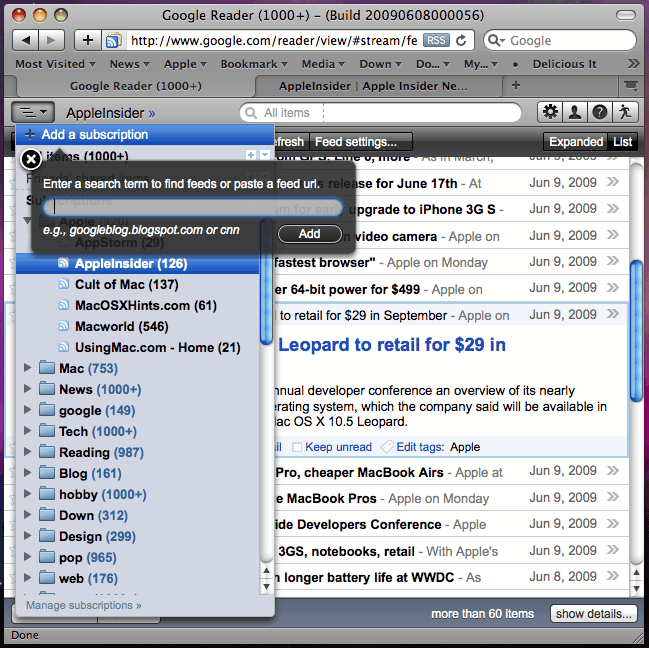
Style for Google Reader: elegant and slick. This style simulates the look of Mac OS X Snow Leopard. Actually the style is taken from iTunes user interface design scheme, marble, which is said to replace the aqua interface.

For nicer navigation pane, use with Google Reader: Mac OS X Snow Leopard+ Delicious.
If you are enabling Offline (Google Gears) feature, use with Google Reader: Mac OS X Snow Leopard+ Offline.
(Optional: Google Reader: Prettier add subscription, edit tag)

Check out my other styles for Google:
Google Login: Mac OS X Snow Leopard
Google Search: Mac OS X Snow Leopard
Google Image Search: Mac OS X Snow Leopard

2009.07.18: FIXED Comment and People pages. [3739]
2009.07.03: FIXED webkit specific view. NEW Google Reader: Mac OS X Snow Leopard+ Delicious [2815]
2009.06.27: CHANGED design of Home and Trends; refined footer; navigation toggler at left bottom. FIXED small tweaks in navigation pane. Thanks to Vincent Volaju. [2540]
2009.06.08: CHANGED toolbar icons are REDESIGNED more Leopard-friendly;-) NEW support for offline by Google Reader: Mac OS X Snow Leopard+ Offline and small tweaks as well. [1944]
2009.06.01: FIXED minor tweaks in feed title and feed menu. [1731]
2009.05.16: CHANGED unbuttonize "Add a subscription". FIXED tag selector pop up. [1065]
2009.05.11: Now it should work better with Safari. Also, it works better for languages other than English. [692]
2009.05.10: Improved search box (only applies to Firefox 3.5). Some tweaks for search results.
2009.04.25: Modified loading message and small tweaks in menus.
2009.04.15: Added trends page and small tweaks.

2009.04.11: Initial release.

Before
After

Discussions [Start new]

Mail the admin.