Google - Hide Username

Google - Hide Username
1340
*****
By USBman
Last updated Nov 09 2008
15 installs this week, 1426 total.

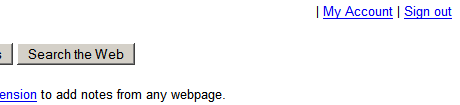
This is meant to hide the Google username for all Google sites (personalized Google, Gmail, Google calendar, Google News, etc). If you do not want the username to disappear entirely, or add back altered content, simply replace "display:none !important;" with the one of the options seen at the bottom of the CSS code.

Inspired by Gmail - Customize header line.. Please make sure to check that style for further options.

(06/18/07 - updated)
(06/23/07 - Updated to include Google Books, while viewing a book)
(06/23/07 - Updated Google Base)
(07/16/07 - Updated Google Patents & Gmail)
(09/08/07 - Updated Google Products)
(09/18/07 - Updated to include Google Presentations)
(09/30/07 - Updated to include *secure* (e.g., https://...) editing of Spreadsheets)
(09/30/07 - Updated to include additional Google search page URLs)
(12/03/07 - Updated to include the "new" version of Gmail - sorry about the delay)
(01/04/07 - Includes Google Movie listings)
(02/06/08 - Added Google blog search, updated Google Finance & Google products)
(03/02/08 - Added Google Code & updated Google Docs)
(03/08/08 - updated the code for Google search results [the inexplicable change to "www.l.google.com" ])
(03/20/08 - updated the code for sites that have changed)
(08/24/08 - updated for Google's new search results code)
(09/26/08 - updated for Google's new search results code ....this is getting too often - enough to be annoying!)
(10/22/08 - updated to include more search results - specifically, pages in which you've search for "define:term")
(11-09-08 - updated to include Google support)

Before
After

Install options

Feedback

Reviews

trentenerfs said on Dec 01 2008

Excellent, (I use it through a Greasemonkey stub that loads the CSS, but anyway...).

Do you plan to add support for blogspot.com? *****

ozzii said on Oct 23 2008

Veru usefull
You can add Google support:

/* Google support */
@-moz-document url-prefix(http://www.google.com/support/) {

#baseDiv > DIV:first-child > STRONG
{display:none !important}
} *****

MkFly said on Oct 03 2008

Nice if you just want to stop the guy at your local coffee house from spying your email address over your shoulder, but the address is still being sent over an insecure connection (on free Wifi for example) to that page. To stop that, you'll need to set the SID cookie to secure, which I've made a GM script for: http://userscripts.org/scripts/show/33643 ****

metalmeric said on Aug 22 2008

It works! *****

ddsafsdfgs said on Apr 19 2008

Nice script...

To have the username showed in the corner in Gmail, but not on all the other Google sites I have deleted this part of the code:

/* Gmail */
@-moz-document url-prefix("http://mail.google.com/"),
url-prefix("https://mail.google.com/") {

/* OLD VERSION */
#guser > nowrap > b,
[class="trb"][valign="top"][align="right"] > b
{display: none !important;}

/* NEW VERSION */
[id="undefined"][class="nQ6QTe"] > nobr > b
{display:none !important;}
}

Update:
Hmm seems that the script only works on google.com domains. Would be perfect if support were added for locale google domains.
It doesn't work changing all the adresses to google.* . That results in it not working at all.
It is a bit dodgy having to ad some extra clone rules for your locale, takes a bit of time. Would be great if all google locales were auto built in. *****

krftrzx said on Jun 16 2007

(i cant seem to do anything except edit my previous post... yeah i know... kinda dumb... ;) hehe... what am i doing wrong?)
-----------------------------------------------------

Great :) :)

-----------------------------------------------------
June 6 2007
Thanks for the update :)
please include the url http://google.com/notebook in the list of urls...
(note that this is not the same as http://www.google.com/notebook)
-----------------------------------------------------
May 31 2007
Yes... google has been making more changes recently.
One of the major change i have noticed is that they seem to be introducing a single consistent bar across all their pages. (on the top in white with various links.)
This should fix all those bars... I have not fully searched for all sites that have been changed though... But i do know that quite a few (including at this moment google, google calendar, google notebook) have been changed.
Heres the css
#guser b {visibility: hidden;}
Note: google and google notebook seem to be working okay using the old css but google calendar is broken
They all use bars now though...
This is the html of the bar
<div align=right id=guser style="font-size:84%;padding-bottom:4px" width=100%><nobr><b>krftrzx@gmail.com</b>&nbsp;|&nbsp;<a href="javascript:gnb._open()">My Notebooks</a>&nbsp;|&nbsp;<a href="http://www.google.com/searchhistory/?hl=en">Web History</a>&nbsp;|&nbsp;<a href="https://www.google.com/accounts/ManageAccount">My Account</a>&nbsp;|&nbsp;<a href="http://www.google.com/accounts/Logout?continue=http://www.google.com/">Sign out</a></nobr></div>
Another thing i noticed on one site (dont remember where) was that the following css had to be used
td[align="right"]>font[size="-1"] b {visibility: hidden;}
The complete style (complete to me that is ;) because i really havent bothered to check for any more sites than what i use) is
{
#guser b {visibility: hidden;}
td[align="right"]>font[size="-1"] b {visibility: hidden;}
}
Okay... Just checked out that gmail works as soon as u login i.e. on the inbox page but not when u open mail.
So thats another thing that needs to be fixed.
I do appreciate the work that has gone into this style.
I will keep you posted on anything else i find broken.
Hoping to see everything fixed soon... ;)
------------------------------------------------------------------------------
May 02 2007
Great style
But needs the following to be added.
1. Google images has to have the same thing as the google web search page. Is broken.
2. Google notebook also works on the url http://google.com/notebook (note that the www. is missing.)
In addition to your style this is what i use
/* Google Images */
@-moz-document url-prefix(http://images.google.com),
url-prefix(http://www.google.com/imghp) {
[align="right"][width="100%"][style="padding-bottom: 4px;"][nowrap=""] > [size="-1"] > b,
[align="right"][width="100%"] > nobr > b
{display:none !important}
}
/* Google Notebook */
@-moz-document url-prefix(http://google.com/notebook) {
[nowrap=""][align="right"] > [size="-1"][face="Arial, sans-serif"] > b
{display:none !important}
} *****

.ad {
/* Your ad can be here instead. 10K unique visitors for $5/day. Mail me. */

}