GMail - Remove ads and relocate action links(alt2)

16328
14740
Install
The recommended way to install user styles is to use Firefox with Stylish.
If you already have Firefox with Stylish, make sure this site is allowed to run JavaScript.
You've installed this user style in Stylish. To uninstall it, open the Tools menu, choose Add-ons, click the User Styles panel on the top, click on the entry for this user style, and click Uninstall.
You've installed this user style in Stylish. To uninstall it, open the Tools menu, choose Stylish, and remove the entry from there.
You've installed this user style in Stylish. To uninstall it, click the wrench icon, Extensions, click Options beside the entry for Stylish, and click delete for the appropriate entry.
You've installed this user style in Stylish, but a newer version is available.
To uninstall this user style, open the Tools menu, choose Add-ons, click the User Styles panel on the top, click on the entry for this user style, and click Uninstall.
The recommended way to install this user style is to .
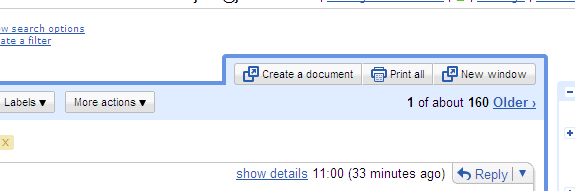
This style removes the ad panel from Gmail or Google Apps Mail, relocates the action links (Print all, new window, etc.) from the side bar to above the message area, and widens the mail content area.
Version 0.2 - 2009-02-13 - I finally found a way to have the buttons in the right order (first one on the left). - (Kind of) fixed the border for the "Turn on highlighting" button.
Version 0.3 - 2009-02-17 - Fixed the action links in the "New windows" (thanks RemailedNet).
Version 0.4 - 2009-02-25 - Integrate with the latest GMail updates
Version 0.5 - 2009-03-04 - Integrate with the latest GMail updates (again) - Handle the notifications nicely
Version 0.6 - 2009-07-07 - Integrate with the latest GMail updates
Version 0.7 - 2009-12-22 - Fix for Google Chrome
Version 0.8 - 2010-07-13 - Fix content width when "show details" is selected (thanks to Henrique Abreu)