The author has marked this style as obsoleted by Google Reader - Stretch, Clean, Style.
Superceded by Opera-compatible extension "Google Reader - Stretch, Clean, Style" http://userstyles.org/style/show/2224


WARNING: THIS STYLE ONLY WORKS WITH FIREFOX, NOT OPERA
Thanks to http://www.xulplanet.com/references/elemref/ref_StyleProperties.html, I found that just a few simple modifications to all elements in Google apps like Reader, Gmail, and Calendar can easily be optimized! It works because Firefox still is not standards-compliant with CSS-3, but it does have some special CSS properties you can invoke that were originally intended for XUL application extensions (chrome based), but still work on HTML/XHTML.
I also reccomend forcing all fonts to be the same size. This goes a long way with all of google.
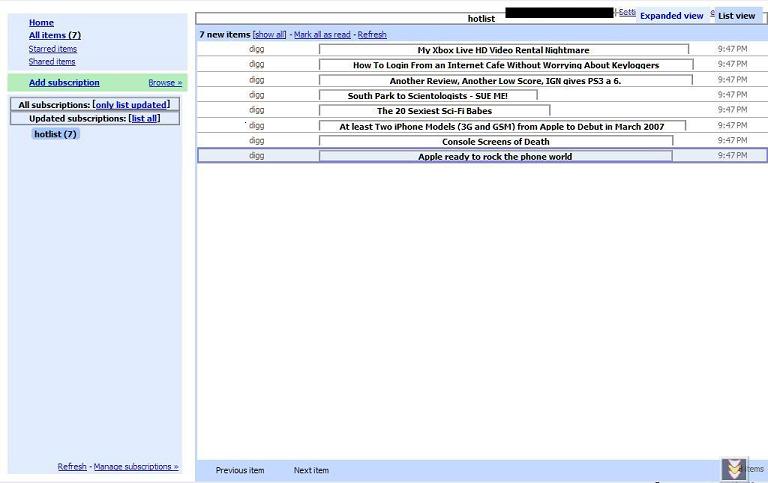
The most important mods are "-moz-box-sizing" and "-moz-float-edge." You can input everything else but those two properties and it'll still look like crap. The difference is freaking dramatic. Just goes to show you what kind of cool things you can do with random trial/error.

This looks even better if you use a single size font for all elements and only differentiate headers and titles by the use of bold and capitals, and center-aligning where needed.
Changelog:
Thanksgiving Day, 2006: Edited -moz-background-clip declaration. Reason: Illegal property.
Moved non-coding CSS. (inside /* */) to long description box. Reason: Makes GreaseMonkey script simpler.
Added code and suggestion to scrub all images from Google Reader. Reason: also optimizes.
Added coloring suggestions I made for original "Google Reader Optimized"
REMOVED ALL THAT PERMANENTLY AND MADE NEW STYLE
added "after" screenshot. 768 by 1024 pixel screen, cropped off firefox window chrome, though.
Saturday, February 10, 2007:
Applied style to all of google.com, as this works perfectly with Docs, Calendar, and Gmail as well.
Monday, Feb. 12 DARWIN DAY 2007
All margins set to auto - works fine
Made left panel look better by justifying text and giving it's innards no margins. Google's css padding still applies.
Made item titles center perfectly by centering all classes/id's with "header" or "title" as well as their parent element matching "secondary".
Clever, but this completely locks out Opera users. Also, I responded to your comment for YouTube Video Only.
I have this install warning : "Error in parsing value for property '-moz-background-clip'. Declaration dropped."
I'll be back to check it out, 'Google Reader Simpler Optimized' seems quite interesting.