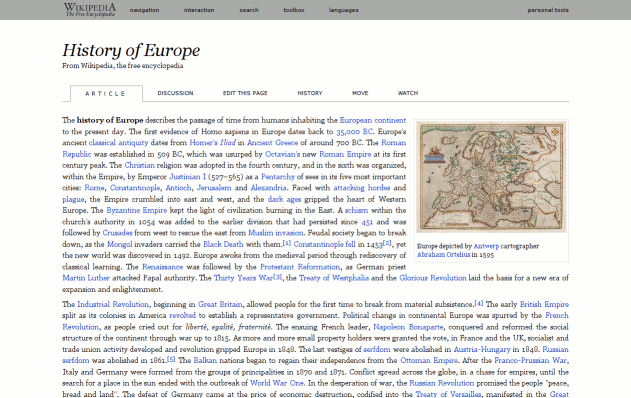
This style sheet overhauls a number of Wikimedia sites (chief among them en.wikipedia.org) for simplicity, legibility and consistency. It replaces the default monobook look with a more classic encyclopedia-/textbook-like theme, turns the menus into the dropdown variety and reduces the number of sister article links (links to the same article on different-language wikipedias) to a more manageable level and allows you to customize which you want displayed (e.g. only the Dutch and Swahili ones).
Please note, that it is still unfinished work and that some special pages, e.g. front page, are not very well suited to this template (i.e. will look stupid). For a sans serif based style that shares a lot of the code, try Wikipedia - Wiki(square). For information on customization or to report problems, please see the forum thread at http://userstyles.org/forum/comments.php?DiscussionID=129. Thanks to everybody for the positive feedback - it is much appreciated.
v 0.12: Header has been reworked (again again) to more clearly delineate it from the article.
Ah! Ah! Serif font! Go away!
#globalWrapper {
font-family: sans-serif !important;
font-size: 175% !important;Great style, thank you!
perfect. I was kind of comparing this style and the "simple research" style. I like both. However, I wish someone combine the two. Say, cut out everything but the search box on top, make column narrower like a blog post and then center the column. This design is elegant, nevertheless. Awesome, and I am going to learn some CSS to make my own design.
Almost perfect, but it doesn't align mathematical equations (LaTeX .png images) and other pictures without borders on their own row right. They should be indented as in default style. For example the equation on http://en.wikipedia.org/wiki/Riemann-von_Mangoldt_formula looks quite weird aligned all left.
Hey I was just thinking that it may actually be a downgrade for a lot of people who do many searches at wikipedia a time. I'm referring to the fact that this new version of the style hides the search box by default. I was wondering if there is any way to get the last version of this script back or just edit it so that the search bar is always shown. Thanks a lot!
Needs a "Load as user script" button, so it can be used with GreaseKit under Safari. This is a great style, I used it with Stylish for Firefox, but now I'm trying to move my browsing over to Safari.

i like Wikipedia - Grey Lady. But i had to edit it a little, because i use ru.wikipedia.org instead of en.wiki... Anyway thanks to chochem!
I really like the look a LOT. I have noticed a couple of issues, though, that should be addressed. I've placed screen captures into a Flickr set that you can see at http://www.flickr.com/photos/billifer/sets/72157602062333345/. The two issues are that columns of UBXs are not aligning and that lists are not nesting. Otherwise, this is officially the best way to view Wikipedia in the browser! :)
UPDATE: All of the issues I'd noticed have been fixed in version 0.9, and so Grey Lady gets an unequivocal 5 stars. :)
Awesome(!) Style!!!
I made a few changes that it looks better on 1024er resolution:
body {
font-family: Verdana, Georgia, serif !important;
/* background: #ffffff url('') 0 0 no-repeat !important; */
font-size: 15.5px !important;
}
#globalWrapper {
width: 970px !important;
margin: 20px auto 0px auto !important;
padding: 0 20px 0 0 !important;
font-size: 15.5px !important;
}PS:
This enables the background picture in the header - this looks a way better! ;)
And it changes the font family to Verdana, its better to read.Additionally I decreased the font size - 15.5px is too large!
Pretty neat, however in the domains you need to add in:
domain(secure.wikimedia.org),
This is one of the best styles I have seen on here, Good Work!
Very good! I did need to use this to get it to work with my 1024 browser width, however:
#globalWrapper {
margin : 15px 0 0 0 !important;
width : 95% !important;
}
This is absolutely beautiful! Should replace monobook as the default look!
Edit, another bug: http://en.wikipedia.org/wiki/Voyager_2#Voyager_2_in_fiction_and_popular_culture has some overlapping text. You can use "div#contentSub + dl > dd > i" to replace the "h(2,3,4) + dl > dd > i" to fix it.
awesome look!
Elegant indeed. Sober. I've taken the liberty nevertheless to replace "font-size: 125%" by "font-size: 100%" in the only line where it appears (Content), since 125% does seem a bit too wide for my taste. Beautiful work, thanks!
i'm a bit of an advocate of cleaning the web of all the distracting crap that takes up space and you never use, that being said, this style is the perfect way to view WP. Thanks for the hard work (:
Clean, simple, and easier to read....I lub it =)