The recommended way to install user styles is to use Firefox with Stylish.

If you already have Firefox with Stylish, make sure this site is allowed to run JavaScript.
You've installed this user style in Stylish. To uninstall it, open the Tools menu, choose Add-ons, click the User Styles panel on the top, click on the entry for this user style, and click Uninstall.
You've installed this user style in Stylish. To uninstall it, open the Tools menu, choose Stylish, and remove the entry from there.
You've installed this user style in Stylish. To uninstall it, click the wrench icon, Extensions, click Options beside the entry for Stylish, and click delete for the appropriate entry.
You've installed this user style in Stylish, but a newer version is available.
To uninstall this user style, open the Tools menu, choose Add-ons, click the User Styles panel on the top, click on the entry for this user style, and click Uninstall.
The recommended way to install this user style is to .
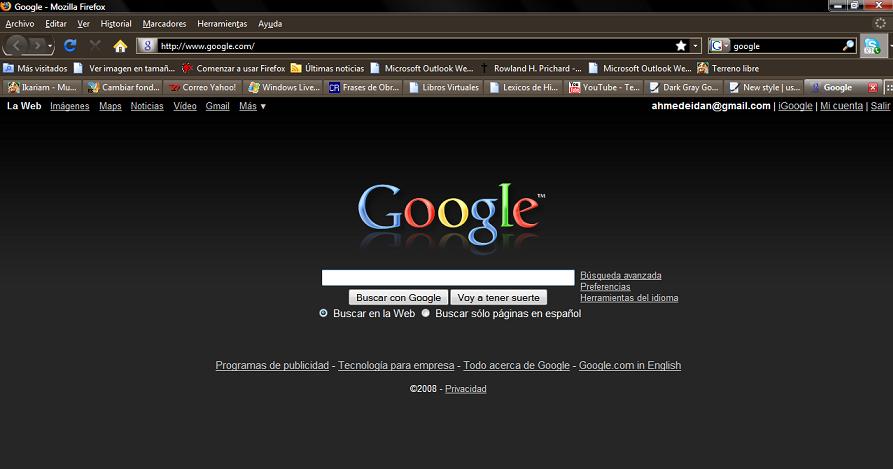
(Actualización del primero de Julio). Actualicé los vínculosde imágenes, videos y mapas que habían dejado de funcionar. Este diseño está basado en el "Dark Gray Google" de QuiestioMarkFTW. La principal, y unica diferencia, es que he cambiado .ca por .com. En la versión original era imposible navegar en .com con las características en negro. Por ende, hice esta versión corrigiendo ese error. Espero que la disfruten...
English
(Update on the 1 of July). I updated the link of images, videos and maps that stoped working. This style is based in "Dark Gray Google" by QuestionMarkFTW. The big difference is that I have changed .ca to .com; it was imposible in the original version navigating at google.com with dark gray color. So, I did this version fixing that error. Enjoy it!!....I am a Spanish speaker, because of that my screenshot is in spanish :D hope you can read it.