New* Google Reader (12/05/08) Tweaks

New* Google Reader (12/05/08) Tweaks
2945

How to install

Created by trashrockx. Last updated Dec 11 2008.
15 installs this week, 1549 total.
*****

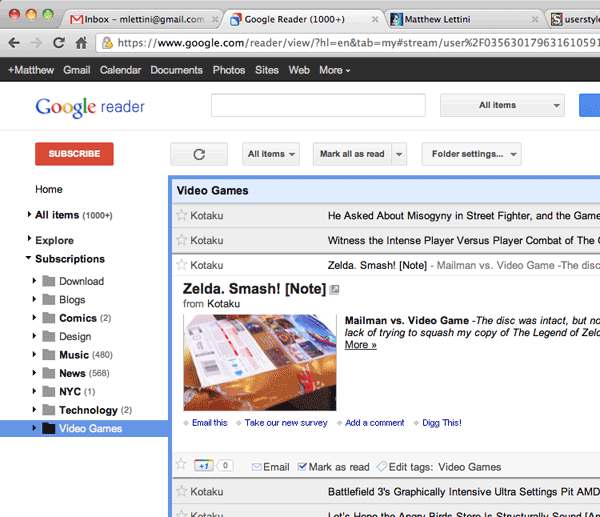
They just updated Google and its much harder to read your feeds and tell what articles are already read. So I created this quickly to make it easier on the eyes and work more efficiently. Bonus: hover styles over entries.

* update 3 * - Google did a sneaky update and I had to fix the sidebar to be blue again (12/11).
* update 2 * - Fix selection color on sidebar. Fixed pixel spacing of icons in the 'subscriptions' and 'next item' buttons (12/07).
* update 1 * - only added two rounded corners at top between the sidebar and main area. to help visually separate (12/06).

If you'd like to remove the next/previous buttons (i do use them so not adding to code) add this:
#viewer-footer {display:none !important;}

Feedback

Reviews

eilern said on Dec 14 2008

Hi
I have made a compact version of this script which is base on your work. In fact, all I do is just add a few lines of css code to your script so that it provide more area for displaying articles.
May I release the modified version of your work on this site?
The code of my script is below.

@namespace url(http://www.w3.org/1999/xhtml);

@-moz-document url-prefix( http://www.google.com/reader/), url-prefix( https://www.google.com/reader/) {

#gbar {
display:none !important;
}

.gbh { display:none !important; }

#logo-container { display:none !important; }

#search {
margin-top:-33px !important;
margin-left:10px !important;
}

#search-input { width:150px !important; }

#search-restrict { margin-top:1px !important; width:88px !important; }

#search-restrict-input { width:62px !important; }

#search-submit { margin-top:1px !important; }

#main { margin-top:-38px !important; }

#lhn-add-subscription-section { margin-top:-26px !important; }

#lhn-add-subscription { margin:2px 10px !important; }

#viewer-footer { display:none !important; }

/***** This part is almost the original code of your work *****/

#nav {background:#EBEFF9 !important;}

.lhn-section, .scroll-tree li {background:#EBEFF9 !important;}

#entries .read .collapsed .entry-title {color:#777 !important;}

#entries-down .arrow {margin-top:5px !important;}

p#global-info a, nobr a {text-decoration:none !important;}

#entries.list #current-entry.expanded {border-width:2px 2px 0px !important;}

.scroll-tree li a .name {color:#555 !important;}

.scroll-tree li a .name-unread {color:#000 !important;}

#entries.list .read .collapsed {

background:#EBEFF9 none repeat scroll 0 0 !important;

border:2px solid #EBEFF9 !important;

}

.scroll-tree li .tree-link-selected, .scroll-tree li .tree-link-selected:hover {

background:#9FCCEB !important;}

#chrome {border-left: 1px solid #9FCCEB !important;-moz-border-radius-topleft:10px !important;-moz-border-radius-topright:10px !important;}

.lhn-section {border-top:1px solid #9FCCEB !important;}

#chrome-header {color:#000 !important;background:#9FCCEB !important;-moz-border-radius-topleft:10px !important;-moz-border-radius-topright:10px !important;}

#chrome-view-links {background:#9FCCEB !important;}

#entries.list #current-entry.expanded {border-color:#579ED0 !important;}

/*#lhn-add-subscription-section {background:#9FCCEB !important;padding-top:1px !important;-moz-border-radius-topright:10px !important;}*/

#chrome-lhn-toggle:hover {background:#9FCCEB !important;}

#entries.list .entry .collapsed:hover {background:#FFFFCC !important;border-color:#ffffcc !important;}

.subscribe-button {background:transparent url(http://www.google.com/reader/ui/1719556566-lhn-sprite.png) no-repeat scroll -26px -14px !important;}

#lhn-selectors .selected, #lhn-selectors .selected {background: #9FCCEB !important;}

}

*****

moo said on Dec 11 2008

Thank you! Yours is the best tweak I've found. And when I just noticed that Google screwed us again today and broke the tweaking of the left sidebar you had already fixed it. Amazing. *****

kappa said on Dec 06 2008

BTW I just want to remove "Previous" and "Next" Button bar at the bottom, that nobody never use. What should i add?

Thanks in advance *****

Discussions

Start a new discussion

Try KallOut Accelerators for Firefox

Mail the admin.