The recommended way to install user styles is to use Firefox with Stylish.
If you already have Firefox with Stylish, make sure this site is allowed to run JavaScript.
You've installed this user style in Stylish. To uninstall it, open the Tools menu, choose Add-ons, click the User Styles panel on the top, click on the entry for this user style, and click Uninstall.
You've installed this user style in Stylish. To uninstall it, open the Tools menu, choose Stylish, and remove the entry from there.
You've installed this user style in Stylish. To uninstall it, click the wrench icon, Extensions, click Options beside the entry for Stylish, and click delete for the appropriate entry.
You've installed this user style in Stylish, but a newer version is available.
To uninstall this user style, open the Tools menu, choose Add-ons, click the User Styles panel on the top, click on the entry for this user style, and click Uninstall.
The recommended way to install this user style is to .
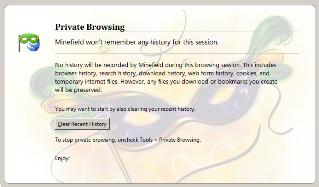
Makes About:PrivateBrowsing display a background image of your choice. About Private Browsing is the new Firefox 3.1 start page, which appears when you enable privatebrowsing mode. The background will be a stylish mask, which fits perfectly with the new mask icon logo Mozilla has made.
Features: + Appears on about:privatebrowsing (when you check this mode’s checkbox on) + Mask background image (transparent and faded) allows text to be easily read + Fully customizable style, for your own enjoyment
Additional Information: You must grab a copy of Firefox 3.5, codenamed Shiretoko or MineField (or higher) for this to work
Firefox Browser Versions: + This style works on Firefox 3.5+ Only
Instructions: In the CSS, change the “data:image….” text I provided to the image you wish to display You may also change the background HEX color to match your image. The background color of text in this style has not been changed, WOW!
Changelog: 1.0.0.1: + Fixed encoding issue. The image should look flawless now.

1.0.0.2: + Renamed Code and Description to Firefox 3.5 instead of 3.1