GMail - Remove ads and relocate action links (alt)

GMail - Remove ads and relocate action links (alt)
16328
12449

Install

The recommended way to install user styles is to use Firefox with Stylish.

If you already have Firefox with Stylish, make sure this site is allowed to run JavaScript.

By lOtR.
Created Nov 27 2008, last updated Jul 13 2010.
14 installs this week, 3966 total.
Average rating: Good

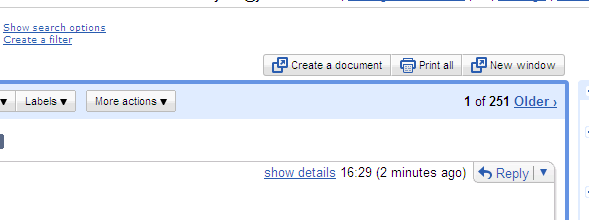
This style removes the ad panel from Gmail or Google Apps Mail, relocates the action links (Print all, new window, etc.) from the side bar to above the message area, and widens the mail content area.

This is an alternative to GMail - Remove ads and relocate action links, with the action links above the content area instead of in the message title.

This should look OK with most GMail themes.
If you use the default theme, you may want to look into GMail - Remove ads and relocate action links(alt2) instead, which is better integrated.

History :
Version 0.1 - 2008-11-27
- Initial Version - based on version 0.3 of GMail - Remove ads and relocate action links.

Version 0.2 - 2008-11-27
- Redesigned the action links so that they look like buttons. This allows the links to be readable even with themes with a dark background. And it looks way better, too.

Version 0.3 - 2009-01-23
- Fix the ad area when the browser window is narrow (thanks pihentagy)

Version 0.4 - 2009-02-04
- The buttons in GMail now have a skin applied to them. The action links are now styled to look like them (including mouse interaction effects).

Version 0.5 - 2009-02-17
- The buttons are now in the right order (first one on the left).
- (Kind of) fixed the border for the "Turn on highlighting" button.
- Fixed the action links in the "New windows".

Version 0.6 - 2009-02-25
- Integrate with the latest GMail updates

Version 0.7 - 2009-03-04
- Integrate with the latest GMail updates (again)
- Handle the notifications nicely

Version 0.8 - 2009-07-07
- Integrate with the latest GMail updates

Version 0.9 - 2009-12-22
- Fix for Google Chrome
Note : if you have a suggestion or want to report a bug, start a discussion, so that I can answer you...

Version 0.10 - 2010-07-13
- Fix content width when "show details" is selected (thanks to Henrique Abreu)

Screenshot

Discussions [Start new]

Contact the admin.











































