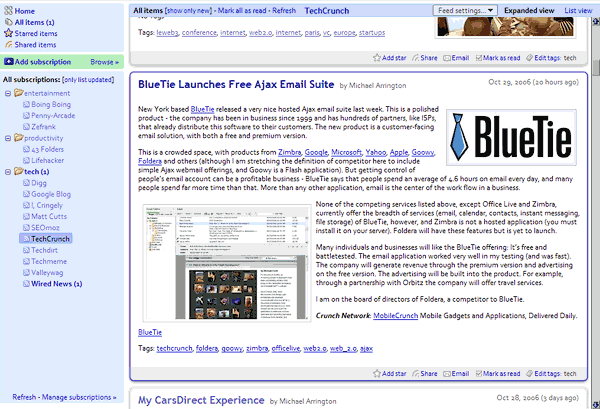
Uses the maximum amount of space for the feed viewing area, at the expense of all unnecessary UI elements.
Before
|
After
|
Doesn't seem to work anymore.
I have done some modification based on Nathan's work: http://userscripts.org/scripts/show/16975
This style is now obsolete.
Useful script .. but since google added the search to reader the layout is messed up.. Can any one help me ??
@ gotmarko
and you'd better change the
#viewer-header {
background:#C3D9FF !important;
width:500px !important;
float:right !important;
margin-top:7px !important;
height:20px !important;
}
in height:24px .it will look better
this is nice but if you use a search engine script, you will run into issues with how everything is aligned
Google has tweaked the layout and added a background and padding to the #viewer-box. I used #viewer-box { background-color: white !important; padding: 0 !important; } to get rid of the extra fluff it introduced.
Reader just moved the refresh from a link at the bottom of the #nav area to a button next to the #all-subscriptions-header.
If you want to get rid of it, add #sub-tree-refresh in the same line as the #all-subscriptions-header.
If I need to refresh the list, I can always hit 'r' to do it.
Mar 16 2007:
It appears a refresh button has also appeared on the viewer bar, so adding a #viewer-refresh to the same line as the #all-subscriptions-header will take care of it.
Does anyone know of a fix so that the tag window doesn't go off the right side of the screen?
Just reading through the comments here, there are some obvious issues with the script which need to be cleaned up. But overall, it's a good start. My experience with the script in Google Reader last night was very positive.
Simple and effective.
Of course it also affected other sites, BOK: It was accidentally submitted as a global initially. Here's something you could have done, smartass, since you installed it as a Greasemonkey script: open your your friggin greasemonkey options and change the includes and excludes your own dumbass self!
this thing kicks aaaaaaaaaaaaaaaaaaaaaaaaaaaaaaaaass.
Where, in this style, I can choose the size of sidebar (on left side) ?
Nice enhancement, but I had two issues and I stopped using the script because of these:
[1] the script also affected Flickr...
[2] in the left pane the "Updated subscriptions: [list all]" was missing.
Can these issues be fixed in a new release? TIA!
I changed ".entry-actions { float:right !important; }" to ".entry-actions { float:left !important; }", this allow me to use better the "Edit Tag"
Any chance you could either get rid of the indent on the folders or enlarge the left "frame" that has the list so that I can read em'?
EDIT: just add: ul .folder .expanded ul { list-style: none; text-indent: -4px; display: inline; !important; }
somewhere in the CSS block to remove the indenting of expanded folders.#sub-tree .sub .link { text-indent: -4px; !important; } will shave off a few more px (or the blue images if you up it to ~-19).
I found it useful to make #nav * { max-width:160px !important; } -> #nav * { max-width:290px !important; } as well since the default width was terrible.
Thanks
p.s. the 0% margin thing kills the scrollbar and a bit of the articles when you are not in 'u' mode.
p.p.s. For some reason the autogenerated greasemonkey script is applied to * (all) sites by default. remove that in the greasemonkey panel and add "http://www.google.com/reader/*"
This is excellent except as noted previously it doesn't resize with the 'u' shortcut. If you could fix that this script would be the best thing ever!
Update: thanks to your comment on lifehacker I figured out a fix. I changed the margin-left:172px in #chrome to margin-left:0% and it works like a champ. YOU ROCK!
doesnt work well with the keyboard shortcut 'u'. apart from that it's great
this breaks my subscription navigation panel