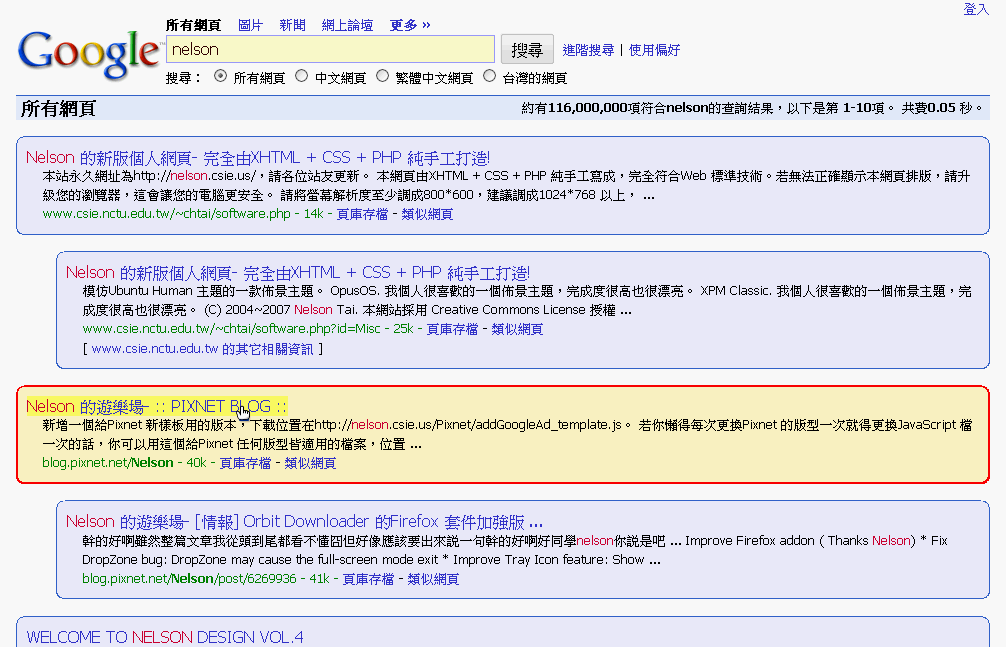
Google: no ads and compact

Google: no ads and compact
823
*****
By Nelson
Last updated Aug 21 2008
37 installs this week, 3741 total.

I love "style 728" and "style 640", thus I use both of them.
But there are some conflicts when using them at the same time.
So I combine and optimize their codes, also I add domains for Google.tw and other areas.
And I add styles for Reader and AdSense Reports, then here it is.

Please take a look at http://picasaweb.google.com/chiahsien/StylishForGoogleService for more detail.
Suggestions are always welcome. :-)

Update @ 20080817
For Google Reader,
1. Make each article's content area 100% width.
2. Highlight when mouse hovers over the list-view title.

Update @ 20071122
Removed codes for Gmail.
I've made a new one for Gmail 2.0, please give Gmail Cleaner and Tweaker (for 1.0 & 2.0) a try!.

Update @ 20071015
Some miner tunes.

Screenshot

Install options

Feedback

Reviews

metalmeric said on Aug 21 2008

One of the best improvements for google. Perfect! *****

kongondo said on Aug 21 2008

EDIT: Hey, I got it to work! I used FF's Web developer extension to view the embedded CSS used by google. I looked at the .g class. In the code for this userstyle, the class is referenced as div.g (i.e., "g" as a class of the ID "div"). In google, it's just .g. So, I just changed the div.g references in this userstyle to .g and voila! So:

CHANGE:

div.g {
border: solid 1px #3366CC ! important;
-moz-border-radius: 10px ! important;
padding: 10px ! important;
background-color: #E5ECF9 ! important;
}
div.g:hover {
border: solid 2px #AB1501 ! important;
padding: 9px ! important;
background-color: #FFF4C2 ! important;
}

TO:

.g {
border: solid 1px #3366CC ! important;
-moz-border-radius: 10px ! important;
padding: 10px ! important;
background-color: #E5ECF9 ! important;
}
.g:hover {
border: solid 2px #AB1501 ! important;
padding: 9px ! important;
background-color: #FFF4C2 ! important;
}
==========================
Hi, thx for this, very nice. It's no longer working though with google search. No more fancy backgrounds n stuff...it's just plain white. Please update when you can, thanks *****

chancewen said on Nov 18 2007

Can you update the new version for Gmail 2.0?
The old style doesn't seem to be compatible. ****

Tombei said on Sep 13 2007

How do I change the yellow search button back to the default Google Search button for this style. ****

PomCompot said on Mar 27 2007

If you are interested, I have followed your example. I have changed my Google: no ads and new style. I have made some little improvement for ad-blocking (more specific than before) and Google preview extension compatibility (a code more flexible than "min-height: 85px !important;"). I have also made the script more specific, it only applied to Google search page results and no more to other pages of the Google domain.

A small note on your style, I think it would be even better if you used Google color instead of your own (for the red color of the border for instance).

Explanations :
- For Google preview extension compatibility, 'overflow: auto' for 'div.g' make the element adapt its size to the size of its inner floating elements (here the Google preview image). It's better than 'min-height: 85px'.
- For ad-blocking, I use an advanced CSS3 selector : 'div[id^="tpa"]' to be really specific and do not block erroneously other elements.
*****

kiyouka said on Mar 03 2007

This is really nice! But it'd be more appreciated if added "google.co.jp". *****

vasyabelkin said on Mar 03 2007

Just great! Thank you.
As far as I can see, for the Google.co.il with Hebrew interface you may want to add
table[align="left"] {
display: none ! important;
}
to remove ads. *****

gn said on Feb 28 2007

Cool! *****

TiSiE said on Dec 11 2006

this is a great style. I like it a lot!
btw: if you use the GooglePreview Extension, you'll find that the preview images are larger than the blue boxes...

to fix that add an "min-height: 85px !important;" to the definitions of div.g
*****

ChoGGi said on Oct 13 2006

very nice *****