The recommended way to install user styles is to use Firefox with Stylish.
If you already have Firefox with Stylish, make sure this site is allowed to run JavaScript.
You've installed this user style in Stylish. To uninstall it, open the Tools menu, choose Add-ons, click the User Styles panel on the top, click on the entry for this user style, and click Uninstall.
Like customizing Firefox? Customize your new tabs with New Tab King.
You've installed this user style in Stylish. To uninstall it, open the Tools menu, choose Stylish, and remove the entry from there.
You've installed this user style in Stylish, but a newer version is available.
To uninstall this user style, open the Tools menu, choose Add-ons, click the User Styles panel on the top, click on the entry for this user style, and click Uninstall.
Like customizing Firefox? Customize your new tabs with New Tab King.
The recommended way to install this user style is to .
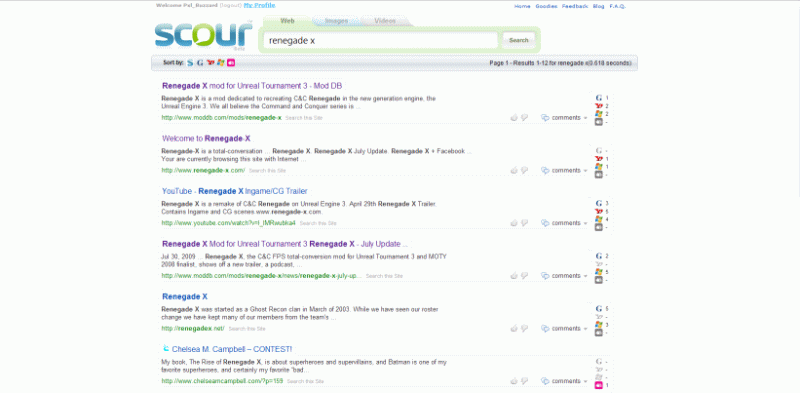
This script makes Scour have a fixed center width, removes the ads, and adds a few other changes to make it nicer to use.

Update Oct 17, 2009: Small fix to make the width of the search bar longer.
Update Oct 4, 2009: Small update to work with the new
Update Sept 29, 2009: Made search bar bigger and confined the search stats to one line.
Update July 13, 2009: Recolored some stuff to make it fit the overall site colors better.
Update May 20, 2009: Small bug fixes. Update May 13, 2009: Removed the feedback button. Update May 3, 2009: Added mouseover colors to the page buttons and added tags for stylish 1.0. Update Mar 15, 2009: Removed some unneeded white space and made the search area bordered. New screenshot again. Update Feb 26, 2009: Added link hover colors, made the menu with "Sort By" look much nicer, and cleaned up the code structure. Also updated the "After" screenshot. Update Feb 12, 2009: Removed Scour tips in the results area. Update Feb 10, 2009: Overall width is smaller, results fill whole area.