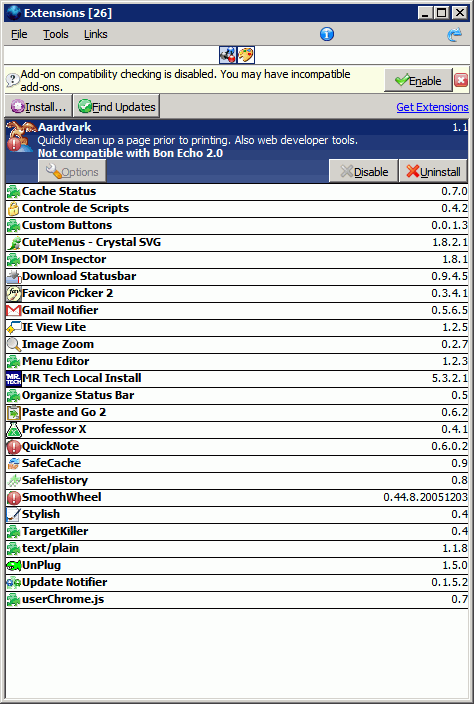
tested on ff2/3 and a few themes
changes icons size (radio/extension icons expand)
removes some padding/margins
shrinks extension list
removes radio label
adds border around radio icons
removes space below unselected items
changs the bottom borders to solid
changs update text to red
centers radio icons
moves version # to rightside
updated for Firefox 3
Firefox - Add-ons - Remove Incompatible Info
if you like the radio icons Firefox/Thunderbird - IconSets
@Selvan777 I don't think you can do that with css
Before
|
After
|
Thanks ChoGGi!! The color is changed! :)

Great job.
When you open the add-ons window it remembers the last selected add-on, could you make it so when you click on an empty spot in the list it forgets the last add-on you selected?
great work!
here is my mod:
@namespace
url(http://www.mozilla.org/keymaster/gatekeeper/there.is.only.xul);@-moz-document
url-prefix(chrome://mozapps/content/extensions){
/*resize icons*/
/*
richlistitem .addonIcon,#viewGroup.viewButtonIcon,#commandBarBottom>button>hbox>image{width:50px!important;height:50px!i
mportant}
*/
/*hide info*/
#viewGroup .viewButtonLabel,richlistitem .addon-description{display:none!important}
/*remove margins/padding*/
#addonsMsg *,#topStackBar *{margin:0!important;padding:0!important}
/*border around radio icons*/
#viewGroup>radio{min-width:16px!important;border:solid 0px highlight!important}
/*center radio icons*/
#viewGroup{display:-moz-box!important;-moz-box-pack:center!important}
/*border between extensions*/
#extensionsView richlistitem{min-height:0!important;border-style:dashed 1px#000!important}
/*red no updates msg*/
#extensionsView richlistitem description:not([value$="..."]){color:red!important}
/*on mouseover change radio icon size*/
/*
#viewGroup:hoverradio{-moz-binding:url(chrome://global/content/bindings/button.xml#button)!important}
*/
/*resize extension icon when selected*/
#extensionsView richlistitem[selected="true"].addonIcon{width:auto!important;height:auto!important}
}