MBlue Nav-Style Awesome-Bar Vista
--------------------------------------------------------------------
Description:
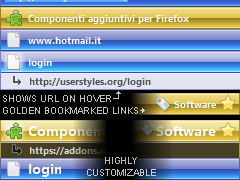
1. Gives the Awesome-Bar the Nav-Buttons Style (Vista).
2. Makes the Awesome-Bar more compact.
3. Makes the Awesome-Bar items displays in one line (the url is hidden, and becomes visible when hovering).
4. Makes the Bookmarked Items golden.
5. Highly customizable.
6. Integrates with the other Nav-Style styles.
--------------------------------------------------------------------
Notes:
If something looks wrong, try to not use other styles that changes the Awesome-Bar settings.
--------------------------------------------------------------------
CUSTOMIZING:
1. ITEMS OPACITY.
2. TITLE TEXT COLOR/SIZE/WEIGHT/OPACITY/ALIGN.
3. FAVICON OPACITY.
4. ADDRESS TEXT COLOR/SIZE/WEIGHT/OPACITY/ALIGN.
5. ADDRESS BACKGROUND COLOR.
> GO TO BOTTOM OF THE PAGE TO CUSTOMIZE
--------------------------------------------------------------------
Supported Extensions:
---
--------------------------------------------------------------------
Integrates with:
MBlue Combine Nav-Buttons Vista ( http://userstyles.org/styles/8620 )
MBlue Nav-Style Url-Bar Vista ( http://userstyles.org/styles/9250 )
MBlue Nav-Style Buttons Vista ( http://userstyles.org/styles/9391 )
MBlue Nav-Style Tabs Vista ( http://userstyles.org/styles/9488 )
MBlue Nav-Style Statusbar Vista ( http://userstyles.org/styles/9590 )
MBlue Nav-Style Throbber Vista ( http://userstyles.org/styles/9749 )
MBlue Nav-Style Bookmarks-Bar Vista ( http://userstyles.org/styles/9831 )
>MBlue Nav-Style Awesome-Bar Vista
MBlue Nav-Style Menubar Vista ( http://userstyles.org/styles/11032 )
MBlue Nav-Style Popup Vista ( http://userstyles.org/styles/11072 )
MBlue Nav-Style Sidebar Vista ( http://userstyles.org/styles/10543 )
MBlue Nav-Style Sidebar Vista (Downloads, Addons, Extensions)
--------------------------------------------------------------------
Updates:
07.10.2008 Ver. 0.2.2 = few fixes (thanks to Ze Thriller)
06.10.2008 Ver. 0.2.1 = code optimized
26.08.2008 Ver. 0.2.0 = ready to release
25.08.2008 Ver. 0.1.9 = few fixes, added customizing options,
24.08.2008 Ver. 0.1.8 = lot of fixes, code optimized
23.08.2008 Ver. 0.1.5 = added the backgrounds, code optimized
21.08.2008 Ver. 0.1.0 = temp version
--------------------------------------------------------------------
Enjoy!
--------------------------------------------------------------------
@ mkiuhredg on Sep 1 2008: the golden color can't be changed (at least in the currest version), you can only customize what's listed under CUSTOMIZING. Please use the discussion i opened for suggestions/help.

--------------------------------------------------------------------
@ Ze Thriller on Oct 7 2008: Thanks!! I added the [selected="true"] and also the [current="true"], should work well now with the keyboard ^_^
--------------------------------------------------------------------
Use this discussion for help/suggestions:
http://userstyles.org/forum/comments.php?DiscussionID=1619
Before
|
After
|
Really nice but there's still a black point: only url color change when browsing (up/down) awesome bar with the keyboard.
I think something like this would do:#PopupAutoCompleteRichResult .autocomplete-richlistitem[selected="true"]
{
background-color: #FFF !important;
}
it would help if you could show what remove and what to change so we can customize ,i would like to change the gold boomark to dark blue .
.ad {
/* Your ad can be here instead. 10K unique visitors for $5/day. Mail me. */
}