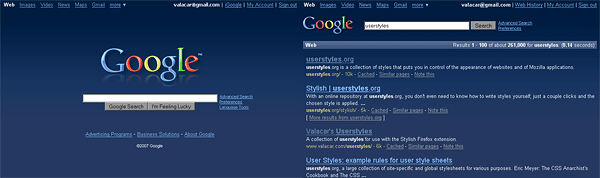
Dark blue color scheme for Google's web search page (classic version only). A dark gray version is available as well: Google Web Search - dark gray redesign (vC)
Note: This style only works for google.com. To make it work for other countries, use a plain text editor to search for "google.com" and replace all occurrences with "google.co.uk" or whatever you use.
More of my google styles:
- Google Web Search - dark gray redesign (vC)
- Google Web Search - gray logo replacement (vC)
- Google Image Search - dark gray redesign (vC)
- Google Video - dark gray redesign (vC)
Feel free to visit my userstyle site at http://www.valacar.com/userstyles/
I love it... It's great.
Wondering something. Is there a way to make this work with everything google, and not just certain parts of it?
Simply Awesome!! We need an official Google reader styled like this! similar to: http://userstyles.org/styles/9437
Thank you very much for the update, awesome style everytime!!!!!
Excellent, works fine here with FF 3.
Aug/3/08: Thanks for the update!! :)
Just great, I also modified it a bit to make it work with www.google.cl (Google for Chile)
Thanks for the style.
http://img179.imageshack.us/img179/5153/screenshot3cr3.png
http://img204.imageshack.us/img204/7915/screenshot5io9.png
- - - - -
It's not working, there is bad syntax.
And WHY there is part of the code of this page in the style????? even my comments????
hallo, first bite, than quest
I'm switching from your dark gray to this one, it is much nicer.
I'm gonna work on making all the google pages match now...
why i don't see load style button? i like this but i don't know to use it.user guide, can't find anywere.plz help
ok,it was turned off java script
I like the style, very relaxing and the colors are great.
I did have some problems getting it work well with the experimental google search for different views. I made some minor modifications.First I added the views google page to the url-prefix array, I added this under the url that ends with custom?:
url-prefix(http://www.google.com/view?)Then I added the modification to the selection buttons to get them working, as shown below:
/* Experimental Search - Views */
/* make selection buttons more visable */
table.vb td.buttonText {
background: #405882 !important;
}
/* make the selected search type more distinct */
table.vbSelected td.buttonText {
background: #405882 !important;
color: #DACA7D !important;
}Thank you again for a great style!
I use google.com.br, stylish REALLY NEED WILDCARDS!
I suggestion, the links need to be more different in a non clicked link and a clicked link, simpli make it darker are not a good thing, usability over visual.
I've really enjoyed this style for a long time.
Unfortunately, Google's SPONSORED LINKS just started showing up on pages that match products. (i.e. type in "razor" or "car" or "hotel")
If you can think of any way to fix it - that would be great!
If you can't, you're still great! thanks..
The Style is amazing, all of (vC) work is just ART !!
Now, since Google changing their site all the time,
(now I get results from www.l.google.com and the Style doesn't work anymore)
maybe Its time to adjust the Style to Yahoo! Search.
Yahoo! Search could be a good alternative while Google making life 'harder' for us,
and changing all the time their website.
doesn't work! help me!!!
conflicting with http://userstyles.org/styles/655; or how to fix the color issue?
Something broked see: http://i7.tinypic.com/6xacya9.png
edit: Ok, it's weird, but now (after few days) working ok
Looks nice, congratulations. Do you plan on making it compatible with Google experimental search? (http://www.google.com/experimental/index.html)
Cheers
Looks great! Now my eyes won't hurt from all the white! My only complaint is that the text in my SiteAdvisor popups were also white. I simply added a couple of style rules to this style and it fixed it (see the discussion I posted at http://userstyles.org/forum/comments.php?DiscussionID=616&page=1#Item_1).
thanks again!
anybody else with a problem in google suggest?any fixes?
i like this
Much better than the default! I agree with Theory, you should make this for more Google services.
I love it! It just needs to work for more of Google's services, then it gets a five. :-)
The style is great, helps the eyes a lot :). I fixed up the Googlepedia dark fixer to make it fit better with this style : Googlepedia Dark Blue fixer.
black
Great style! thank you very much, perhaps could be a good idea to design also the style of the google news, I use them as homepage, and it would be nice to use this style there. Could you try it? thanks a lot
Works great, but makes googlepedia break. You might wanna add this Googlepedia dark fixer to yours.
I also would like a dark grey redesign for this style thanx...ntw, I like what you've done.
Awesome! Could you make a dark grey redesign also, to match Google Images and Video?
Wonderful Style, very nice!
Ok, un-installed Stylish and installed it again. It's back to normal, except the gray google video thing, it still doesn't work :P
EDIT: Oh, the gray does work, just not on the main Google video page...
WONDERFUL!
very nice but I don't get the google logo for Google.ie
Pic: http://img243.imageshack.us/my.php?image=untitledll1.jpg
This is fantastic, it looks great. I really hope you're working on a similar one for google personalised home, 'cause the blandness is driving me crazy now I'm used to your dark blue version.
Very nice. I was sick of vanilla Google.
Great style - looks fantastic!
One suggested addition - if you are using the black box search plugin for Greasemonkey (routes all your Google searches through an anonymous proxy), add the following URL to each of the lists of @-moz-document url sections:
url-prefix(http://www.blackboxsearch.com/cgi-bin/search.cgi)Otherwise the search results default back to the regular Google look.
Everytime I load one of your styles into Stylish, when I try to save I get and error message "TypeError: stylesheet has no properties"
Very nice & comfortable - A pity only Google's Web search is handled.
Here is modified version to work with google.bg. Basicly you should only change the domain names, but in bulgarian version the logo image was set as background for a div tag and called logo_plain.jpg, so I add one more rewrite rule. It have a bug - the "Bulgaria" caption is too far from the logo, so if somebody can fix the position or just hide it, please post the fixed code
http://it-light.net/Darhazer/google.bg.css
would love this for personalized home.
Great style
Great look. I'd like to have this one for image search, too.
Ever thought of making personalized home?
Beautiful! You should make one for Gmail, I would love that!
Great job! The only problem is that the Google banner images don't adapt to the blue background. They are still white. I did a straight copy from your code, so I don't think I messed up, but it's possible. Here are some screenshots to let you see what I am talking about:
http://i57.photobucket.com/albums/g223/daedalus42/google01.png
http://i57.photobucket.com/albums/g223/daedalus42/google02.png
Yes, very nice! Good job!
Much easier on the eyes.
google never looked better! the other styles for image/video search are awesome too! I am not sure which i like better the blue or black but I think you should offer both styles for each! I am already dreaming about Dark Gmail! :D