OS X Style Google Reader

OS X Style Google Reader
2479
*****
Last updated Jan 16 2008
175 installs this week, 32542 total.

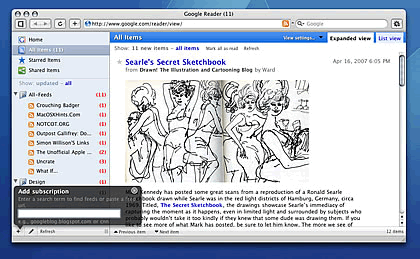
A style for Google Reader that styles it like Mail.app. Its not trying to be original or ‘better’ than the default theme, it’s just trying to make it look like a Mac OS X app!

As the original CSS was too large to accepted onto userstyles, you have to load the fancy-schmancy loading graphic separately:

http://userstyles.org/style/show/2336

Screenshot

Install options

Feedback

Reviews

bugmenot2 said on May 19 2008

Very nice style.

BTW small bug I notced, under View Settings the arrow is not perfectly aligned with the menu items:

http://i29.tinypic.com/sndx6o.jpg

More bugs:

The stars are not aligned well and the feed name overlaps with the title:

http://i25.tinypic.com/14v6a2r.jpg ****

pihentagy said on May 15 2008

Same problem here!

Spinner container is at center, but only the top of the spinner is visible. FF3b5 here.
So please update the style!

A simple fix would be:
div#chrome div#viewer-header {
z-index: 1000 !important;
} ****

botsmack said on Apr 21 2008

***Update 2008-04-18 ***

I've fixed the current entry outline issue. Just add these lines of code to the CSS.

/* Background positions of the 4 corners */
#current-entry .card .ctl { background-position:0 0 !important; }
#current-entry .card .ctr { background-position:-16px 0 !important; }
#current-entry .card .cbl { background-position:0 -50px !important; }
#current-entry .card .cbr { background-position:-16px -50px !important; }

/* The top and bottom border */
#current-entry .card .ct { background-position:0 0 !important; }
#current-entry .card .cb { background-position:0 -50px !important; }

/* The left and right borders */
#current-entry .card .cr,
#current-entry .card .car { background-position:-16px 0 !important; }
#current-entry .card .cl,
#current-entry .card .cal { background-position:0 0 !important; }

Hope this helps! By the way, I've only tested this on FF 2.0.0.14 on Windows XP Pro and I was using the Stylish extension at the time.

I've emailed Jon in case he wants to make an official note of the changes. I still am having an issue getting the right border (or what appears to be a border) for the action row to remove. But this is a start. :)

Just figured out the fix for the "border". Turned out it was the background color. Just add this to the css to fix the gray right "border" for the action row.

.entry .card .ca { background-color:#ffffff !important; }

*** Original Message Below ***
Been a user of this skin for the longest time. It's what makes Google Reader the best. For the past few months, though, I have experienced some weird layout issues. The loading animation is no longer visible and the current item is longer outlined. I have not seen anyone else report this, so I was just checking to see if it was me or if others are getting this same issue. I've tested it in Firefox 2 (Mac & Win) and Safari 3.1 (Mac & Win) and get the same thing on all. *****

Gabe said on Apr 07 2008

@botsmack... yes, I'm having the exact same problem :( This is an amazing custom css style, but unfortunately, Google broke it after they modified the interface a month or so ago (during SXSW, I think) to give us about 17 extra pixels. Thanks google, but you made it worse for me ;).

I've gone back to using Google reader sans this custom style, but check back here every week hoping that Mr. Hicks has updated.

Jon - If you're reading this... please help a bruvva out. Your custom style makes me want to lick me screen. *****

petersw said on Feb 20 2008

This is really a great skin. The only problem I have is with the "Folder settings..." menu. It appears to be opening up behind the message list box, not in front of it. As a result, I can only see the first 2 lines ("Sort by newest" and "Sort by oldest"). Can this be fixed? *****

hug said on Jan 31 2008

nice *****

Lapino said on Jan 24 2008

I had 2 small problems with this otherwise great theme:

1. A small vertical grey stripe in the bottom right of every entry (next to the action bar). I fixed it by changing:
#entries .entry .card .ca,
#viewer-box{background-image:none !important;padding:0 !important;}

to

#entries .entry .card .ca,
#viewer-box{background-image:none !important;padding:0 !important; background-color: transparent!important;}

2. The links to change between "Read", "Starred", "Shared", etc. in the trends screen are not visible, I solved this by adding this to the style:
.trends-columns .tab-header td.c{
color: #1010C8 !important;
}
.trends-columns .tab-header-selected td.c{
color: #FFF !important;
}

I hope this helps some people.
I really like this theme BTW and the last update made it even better! *****

bzikofski said on Jan 17 2008

It's very very cool but not perfect.

There's some issue with height of the RSS feed title. I have two categories of feeds, whenever I'm at one feed in first category, and navigate to another feed in second category, I get the 1px move of other feed titles. This is quite annoying ;)

Also the "Search" button has some strange font - it doesn't align well. And of course the drop down left to "Search" button - when clicked, it shows a list but it's not aligned again - I can't see the titles and it goes behind the blue top bar.

In my opinion the font in the top gray bar and in the "Feed Settings.." and buttons for views should not be bold - with normal style it would be more elegant...

Right now it's a bit better than an average style.

------------

I've fixed some of the bugs -- check thread here: http://userstyles.org/forum/comments.php?DiscussionID=733&page=1#Item_4
(I forgot to add that I'm experiencing it in Firefox under WinXP)

The "Search" Button would have to be re-created.

---------------

It's much much better after the update.. I really like the smaller font here and there..
Excellent! *****

AaronCompNetSys said on Dec 27 2007

Excellent *****

Dust For Eyes said on Nov 30 2007

Love it.

Let's hope it can be updated to include Google Reader's Discover function. *****

grandin said on Nov 25 2007

Absolutely adore this style. Flawlessly clean. Please please please do the same for Gmail! Thanks! *****

ppisarczyk said on Sep 29 2007

Anyone know of a way I could remove the folder indent in the subscription pane? I could'nt find any code pertaining to expanded folders... *****

Gidgidonihah said on Sep 27 2007

Yeah, cursed layout changes. All Items through Trends is pushed out to the right. Is there any way to autoupdate the script or anything? *****

Cruse_Car said on Sep 27 2007

Awesome!! *****

boblet said on Sep 26 2007

Google is at it again - another update means layout breakage as of 27th September (feed list column is outside the reader to the left, pushing everything else the same width right). This is a fantastic user style - major props to Jon. Thanks too for the Creammonkey heads-up Jon. *****

Leira said on Sep 20 2007

seems google reader have another update these days, right now with this OS X Style, the Home item in the left and the feed title moved a little down than before. there is a white blank gap between the feed title bar and the search tool bar, and a even wider gap between the Home item and the search tool bar. it seems this style need another change now. i love this style, it's far more better than the official one!

BTW, i like the old auto-hide account bar style more, it gives even more space to read. i hope if you can make the search tool bar auto-hide again? after all, search is not such a really often used feature. *****

avocade said on Sep 16 2007

Google, eyes forward! *****

dying said on Sep 13 2007

Thanks for the update. Google should make Reader be able to have skins and this should be the default.

By the way I noticed a sorta misaligned thing.... you know the "Show: 0 new items - all items" and "Mark all as read, and refresh" little bar, well it sits alittle far down and the top link in List View is sometimes hard to click, just thought I'd let you know. *****

Matt Groves said on Sep 10 2007

Thanks so much Jon ! *****

abqnm said on Sep 10 2007

THANK YOU! *****

azuwis said on Sep 08 2007

dirty hack for search bar and other, have a try :)
don't expect to much, for I'm a rookie to css...

/* dirty hack by azuwis, for google reader 20070907 changes */
#nav {
width: 230px !important;
border-right: 0px !important;
}

#nav-toggler {
background: #E5EDF7 url(data:image/gif;base64,R0lGODlhBQAJAIABAJmZmf///yH5BAEAAAEALAAAAAAFAAkAAAIMjAMHidsLXTRQMVoAADs%3D) no-repeat scroll center !important;
margin: 0pt !important;
border-right:1px solid #939393 !important;
width: 10px !important;
}

#chrome {
padding-top: 0em !important;
}

/* Search bar */
#search {
padding-bottom: 0px !important;
width: inherit !important;
left: inherit !important;
right: 0px !important;
top: 2.8em !important;
}

#search-input {
width: 80px !important;
}
#search-restrict {
width: 80px !important;
}
#search-restrict-button input {
width: 60px !important;
}
#search-restrict-button .goog-combobox-button {
width: 75px !important;
} *****

xion said on Sep 08 2007

can't wait till the stylesheet to be fixed..!
so I added several lines of code to the style and made it work for the new Google reader update, though i have hidden the search bar and the spinner since i dunno how to style them.

/*cheap fixes*/
#overview-selector.selected {margin:0 !important; padding:0 !important;height:25px !important;}
#search, #nav-toggler {display:none !important;}
#nav {width:240px !important; padding-top:20px !important;}
#loading-area {display:none !important; }
#chrome {margin-top:-20px !important;}
li.chooser-item {padding: 0 16px 0 16px !important;}
*****

patrickhowell said on Sep 06 2007

This is my favorite style sheet for any site!
I would love to see it updated for the new Google Reader. *****

foxkid said on Sep 06 2007

very nice...
and the google reader update its style,this style must update soon *****

dangdangdang said on Aug 27 2007

*****

Kahil said on Aug 24 2007

The refresh button only seems to refresh the sidebar and not the content section. I really like this theme and would love to see one like it for gmail. *****

dikamilo said on Aug 16 2007

Very nice and useful style :) Thanks *****

JuanBR said on Aug 11 2007

*****

sgallant said on Jul 19 2007

This is amazing.... how about a gmail skin next? :-) *****

Synergy said on Jul 18 2007

Is it only I that the image under the entry has fallen into disorder?
*****

rugby471 said on Jun 20 2007

Welldone, only thing that stops it being a five star is the fact that the home screen is too close to the left sidebar. Other than that, great.

( PS if you wish to add the trends menu selector, add the text below,

#selectors-box #trends-selector a {
background-image:url("data:image/png;base64,iVBORw0KGgoAAAANSUhEUgAAABIAAAASCAYAAABWzo5XAAAABmJLR0QA/wD/AP+gvaeTAAAACXBIWXMAAAsTAAALEwEAmpwYAAAAB3RJTUUH1wYKDDMqBdjGcQAAAuJJREFUOMuVk79uJEUQxn/1p2d27F3vesdee3WATgiJ4HTBXYbEWxAQ8gA8Aa/BO5D6IZAuQz4SEhvkwMGduQDJO9x5p6e7CXbHAhEgPulTV9JVX9VXJQAXFxerZ8+efS8iX5ZSqKoKVUVEUNV/UURGXt7c3Hz78uXLWwdo2/ab2Wz2NUDXdZRSQEBUUFNMDbN/cl/sSdu2vwDfOUAI4XOAGCOX1z9xenpOFQLBd3R3qn0cQkVKkfXyCVVVUUr5DBAH1MxagGEY+LO+57z9GPWAWoWao+qgRlFDame72ZBzZo8loA6Iqp6oKu7OwfSA3369oapqjo6OMBQXp5lMkAxnT84R282olIKqHo+KrJSyBBARjmYzmklNsMCknhAs4GoECxi7BGqGiACgqnPAHHDgZHRieXCMhQNMDVfbv47JLjYxRAMAOWc2m81SRIKv1+tKVY9EhL7v+aj6lJQylVXklHExNO8UBHPYbrHJgmEYGIaBDx8+HDx9+rTWFy9eLMwsiAh1XSOiuwTmxD5S8q7yMAxYHKhvf8b++J0YI9vtFlX158+fL/Ts7GwZQtBx+USElNLjMEeMLnXAwz4JgJlp27bH3jTNaQhBxhl1XQfAw8MDMUZUldGIe+C++QTLznxftKoq6ro+9ul0eurujxu7WCzYbrc7682YTCbknIkxPsaTyWRUg7sznU5P/PDw8Nz2dpoZb968IedM3/d0XYe7k1IipUTbtrx79466rlmv14+32DTNibv7yagIYD6f0/c9i8WCUgpN05BSYhgGptMp2+2WpmkY/7g77t66mZ2EEFBVSim8f/+elBJ934+ukFIixvjolIgwn88Zr8HMlh5jnG42G2azGWbGarUi50zTNIQQqKqKnDMpJZqmwcwIITx2cH9/T4zx0K+url5dXl5+9fbtW7e/rf5/oZRCSonb29v++vr6lb9+/fqHrutstVp9ISLG/0DOebi7u/vx6urq4i8XehfAVRbnrQAAAABJRU5ErkJggg==") !important;
}

EDIT: Re-voted to a five as I have figured out how to add that 10px of padding, input the following to the style :

#viewer-page-container {
padding: 0 0 0 10px !important;
}
*****

bugmenot123 said on Jun 07 2007

This excellent style needs to be updated for the addition of "Trends" to the top left panel box. Other than that, pure beauty. *****

highmtn said on Jun 05 2007

Needs 10px of padding on the left of the content window for the home screen....otherwise, great. ****

cloudchen said on May 07 2007

*****

mislav said on May 03 2007

Damn nice! I'm not an OS X user, but this looks extremely detailed and well thought of! *****