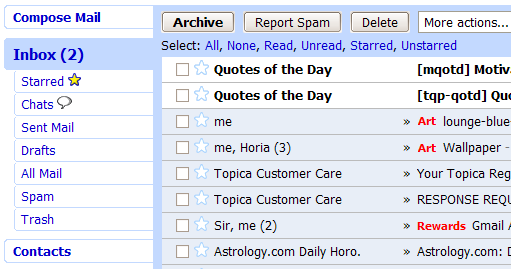
This is a Gmail Skin inspired by airways ;-)
Please use Stylish only! It does not install correctly on Greasemonkey.
(It seams the generated Greasemonkey script includes * sites, not gmail only)
Credits:
- funkjedi for Gmail: Revisited
- ariel for Gmail - Customize the navigation menu
- and others..
Tip: On Windows XP, fonts looks different with anti-aliasing effect
(Desktop Properties > Appearance > Effects > Use ... smooth edges ... > Clear Type)
***
bcqdan@gmail.com
Here is the new Gmail Air Skin 2 for Gmail 2:
Gmail Air Skin 2 (with ads-block)
It's not global style.
UPDATE?
Please?Looks great, and got used to it, until Gmail was updated....
Very nice style.
Is there any chance for update? it doesn't work with the new gmail
Not as excellent as anyone thinks... This style removes the "edit labels" button!
Recycled!
Excellent!
Thanks.
This style is excellent! I ended up tweaking a couple of things (changed Label color for messages to green instead of red, and unhid the Edit Labels link). What I'd like to do is increase the width of the entire Gmail sidebar, but I don't know what div controls it. I've posted my question in the Style Requests forum (http://userstyles.org/forum/comments.php?DiscussionID=374) so please direct any answers over there. Thanks again for a great skin!
To Mastavic, open up the gmailairskin.user.js file and search for "red". There's only one mention in there. Change it to whatever color you wish...
very sleek style, looks great except for the red label ids in the subject line.
edit: P.S. uploaded a new version of the same style with green labels in the subject box. This is (i think) the same as the original gmail layout. Gmail Air Skin With Green Labels In Subject Line

Really like the left panel, but the red text for Labels in the Inbox is a bit too bright for my eyes. Is there any way to have the left panel but not the red text? Thank you.
This really cleans things up! Thanks, 1212jtraceur.
That is some slick stuff...
Yes it's really perfect :)
Perfect skin !!
some screenshots would be nice ;)
My Stylish says that this userstyle contains errors...