Google Tahoma (unified font style) v1.2

Google Tahoma (unified font style) v1.2
57
****½
Last updated Dec 02 2008
91 installs this week, 8396 total.

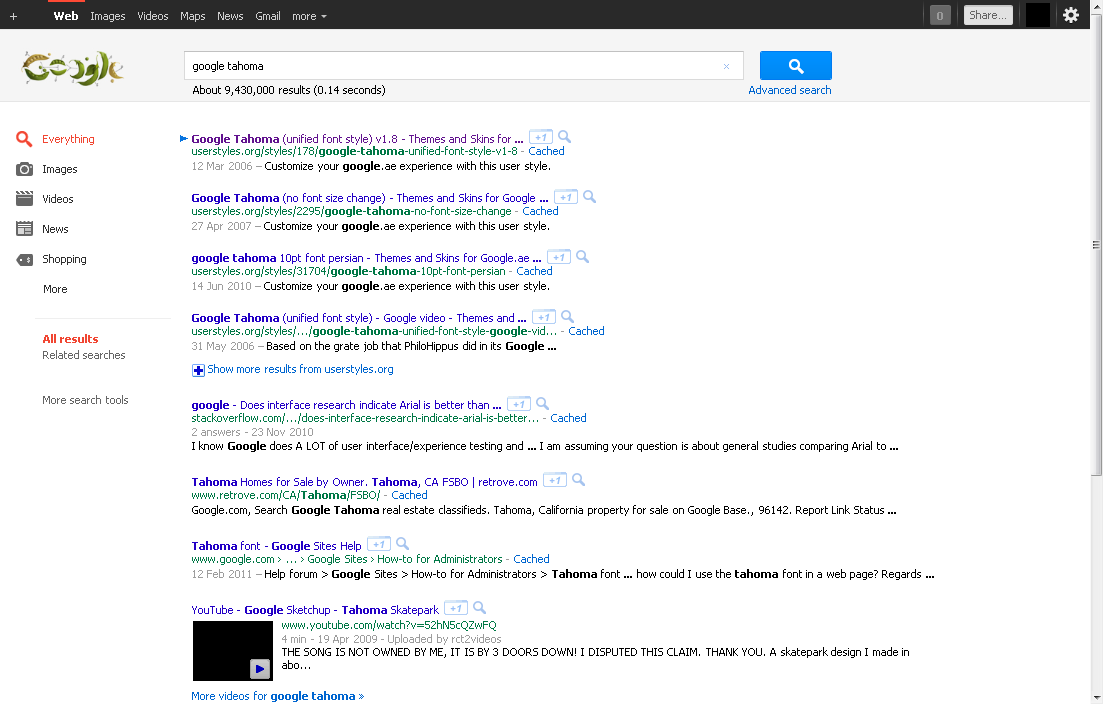
Do you like the sleek look of the standard Windows system font Tahoma? Want to make all your googling experience Tahoma-like? This is a style for you! Affects all things google, be it gmail, web search, groups, reader, notebook, news, whatever. The style is simple and straightforward, it just makes google use the same font and font-size for everything, so even if you don't like or don't have the Tahoma font, or find the size too small, but still want to make google have a cleaner fixed font look, then just edit the font or font size of this style.

All the best

Changelog:
v0.2 - added virtually all google domains || added "SELECT" and "OPTION" tags
v0.3 - added "A" tag
v0.4 - added "LABEL" tag || incorporated the Google Video info pane width fix by ariel. Cheers! (and sorry that took so long)
v0.5 - added "P" tag
v0.6 - removed obsolete section correcting old gmail ui || added a section removing underlining in links. it's clearly identified if you don't like this change || since youtube is getting a more googlified look, added youtube to list of websites. it's the second domain right up top so you can easily delete if this change annoys you.
v0.7 - removed obsolete google video ui fixes || added h1 to h6 tags
v0.8 - added a fix to the new google maps layout, where horizontal scrollbars appeared in the directions pane. Added Sans as secondary font, for some linux compatibility.
v0.9 - added a fix for picasa gallery view, still a bit dodgy though, would appreciate input from more experienced CSSer. Thanks Domdom for pointing this out.
v1.0 - brought back the alteration to the width of standard web search results, text now spans across 100% of horizontal area.
v1.1 - further tweaking due to picasa gallery errors (was producing 8pt tall images in gallery view. worked around it by setting a fixed width, but thumbnail size slider will not work)
v1.2 - replaced all that lengthy list of HTML tags with just plain "*". Great stuff thanks for the tip bubonicfish ! Added "text-decoration: none" to the main section. I feel it adds to the clean and sleek look of this style, but if you miss text underlining in some google areas just delete this line.
Before
After

Install options

Feedback

Reviews

bubonicfish said on Nov 22 2008

It's amazing!
I changed the font to Zekton, and it's greeat!
BTW, You can change the gmail chat font problem by changing:
------------------------------------
domain("google.co.zm"),
domain("google.co.zw") {

* {
font-family: YOUR FONT !important;
font-size: 8pt !important;
}

/* fixes picasa gallery view */
------------------------------------------
It changes ALL the fonts
:D *****

Artz said on Nov 20 2008

I makes font in gmail in chat window too small (the one in input area). It needs fixing.
Anyway the best user style I ever used. *****

carini said on Oct 11 2008

Looks great so far. :) *****

Domdom said on Sep 06 2008

It breaks the "Gallery view" in Picasa Web albums and display only tiny thumbnails. Is there a fix? ****

ddss said on Aug 08 2008

Does not work for me. Google maps directions becomes very narrow with scroll bar.

bugmenot2 said on Jun 05 2008

Ok I tried again and its working fine this time. *****

MrFreeze said on May 12 2008

In Windows Vista Segoe UI looks much better than Tahoma (and Arial of course). Have a look also here: http://userstyles.org/styles/6896 ***

bugmenot1 said on Feb 06 2008

*****

Pavithran said on Oct 26 2007

Wow, so neat! *****

RS1990 said on May 18 2007

This script recently stopped working for me on the iGoogle personalized homepage. It pushes the entire page halfway off the page to the right. Any ideas on how to fix it since I want to keep this script enabled, I love the look of it. Thanks.

Edit: A little more info...it seems to work fine if I change the font size to 10.

stvspl said on Apr 17 2007

Looks nice. Can't say anything wrong *****

Bobroudav said on Apr 16 2007

I would add this:

a {font-family: inherit !important;}

to prevent links from using Arial (they do use it at http://mail.google.com/). *****

bala said on Mar 01 2007

perfect! *****

minnelli said on Jan 23 2007

This has been working perfect for me for about 6 months. *****

grawity said on Dec 07 2006

Elling said on Dec 06 2006:
> Am I the only one not having the actual "Load Userscript" button appear on this page? It works for all the
> other styles on this site (and I do have Greasemonkey installed).
I have this problem too. Maybe it's because this style has multiple "@-moz-document" selectors - one for all *.google.* and other for just mail.google.com (fixing margin bug). *****

Elling said on Dec 06 2006

Am I the only one not having the actual "Load Userscript" button appear on this page? It works for all the other styles on this site (and I do have Greasemonkey installed).

The JMW Owner said on Oct 25 2006

Sorry, but it didn't work. Still looked the same as usual. **

ariel said on May 31 2006

gmail now has a great look.
I added to mail.google.com domain block this addition:
span.ct {font-size: 7pt !important;}
it makes the green label attached to each message smaller. I think it looks better like that.

EDIT: Check the style <http://userstyles.org/style/show/426&gt; for support for video.google.com domain. *****

Paulfox said on Apr 20 2006

Excellent and easily tweakable to your own taste. Like reddeye, I went with 9pt (Verdana), added ".p, a { font-family: Verdana !important; font-size: 10pt !important; }" to Google to make the blue titles stand out a little, and widened the GMail margin to 160 - both Google and GMail now look MUCH better! Thank you very much indeed. *****

Julian said on Apr 10 2006

Looks much cleaner. I like it. *****

reddeye said on Mar 27 2006

Makes Google and Gmail look much better. 8 pt. font was a little too small for me, so I changed it to 9 pt. *****

.ad {
/* Your ad can be here instead. 10K unique visitors for $5/day. Mail me. */

}